
Minimal session manager for Neovim with a floating UI.
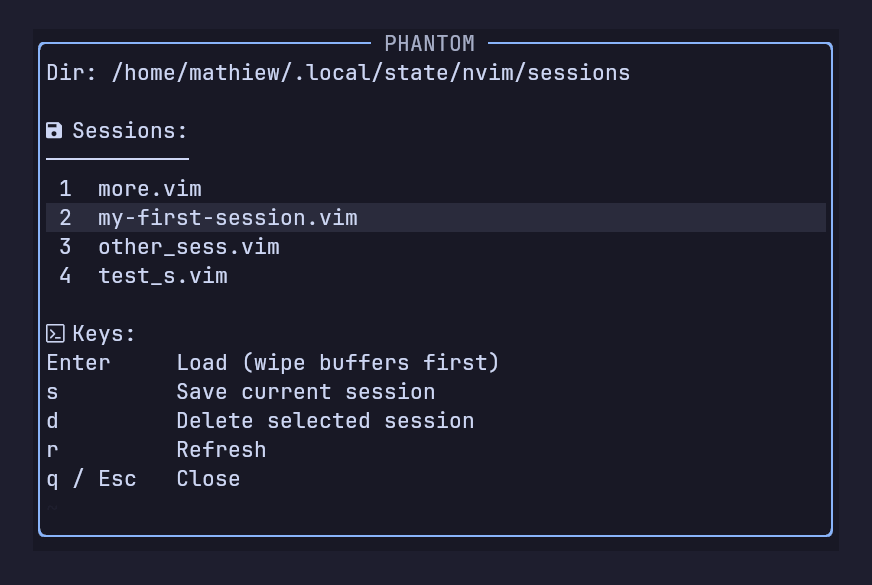
Phantom lets you manage sessions from a single window:
- List sessions
- Load sessions (with buffer wipe)
- Save current session
- Delete sessions
No commands to remember. One key. One UI.
- Neovim >= 0.11.0
- Floating window UI
- Save / load / delete from the same window
- Buffer wipe before loading (no mixing)
- Works with lazy.nvim
- Cross-platform (Linux, macOS, Windows)
- No dependencies
{
  "Mathiew82/phantom.nvim",
  config = function()
    require("phantom").setup()
  end,
}
Then run:
:Lazy sync
For more information about this plugin, see also:
:help phantom
Open session panel:
<leader>sls:Phantom
Close window:
q<Esc>
Default config:
require("phantom").setup({
  session_dir = vim.fn.stdpath("state") .. "/sessions",
  notify = true,
  wipe_on_load = true,
  keymaps = {
    list = "<leader>sls",
  },
  float = {
    border = "rounded",
    width = 60,
    height = 16,
    title = "Phantom Sessions",
  },
})
You can customize the plugin by passing options to setup():
require("phantom").setup({
  -- Directory where session files are stored
  -- Default: stdpath("state") .. "/sessions"
  session_dir = vim.fn.stdpath("state") .. "/sessions",

  -- Show notifications (vim.notify)
  -- true  = show feedback messages
  -- false = silent mode
  notify = true,

  -- Wipe all buffers before loading a session
  -- true  = clean state (recommended)
  -- false = keep current buffers (may mix)
  wipe_on_load = true,

  -- Keymaps
  keymaps = {
    -- Open Phantom floating UI
    list = "<leader>sls",
  },

  -- Floating window settings
  float = {
    -- Window border style
    -- Options:
    -- "single", "double", "rounded", "solid", "shadow", nil
    border = "rounded",

    -- Floating window width (in columns)
    width = 60,

    -- Floating window height (in lines)
    height = 16,

    -- Window title
    title = "Phantom Sessions",
  },
})